Amazon FBA Fees, Reimbursements & Refunds in QuickBooks - Full Breakdown
For e-commerce brands utilizing Fulfillment by Amazon (FBA), managing financial data is a notoriously complex endeavor. Amazon does not just send a clean invoice; it presents a multi-layered ecosystem of operational costs, dynamic surcharges, automated inventory adjustments, and bi-weekly payouts.
Relying on simplistic data entry or booking the net cash deposit into QuickBooks Online (QBO) is a dangerous shortcut that distorts margins, understates gross revenue, and creates massive compliance issues.
This guide provides a comprehensive breakdown of the 2026 Amazon FBA cost stack, the mechanics of returns and reimbursements, and the exact workflows required to maintain a US GAAP-compliant, audit-ready set of books in QuickBooks Online.
1. The 2026 Amazon FBA Cost Stack & QBO Mapping
Amazon’s cost structure comprises eight primary fee buckets. To ensure clean financial reporting, every multichannel brand must understand both the operational triggers of these fees and their proper structural categorization in QuickBooks.
Referral Fees (Sales Commission)
What they are: A percentage-based commission charged on the item’s gross selling price (including shipping, excluding sales tax). Most categories remain anchored at a 15% rate, following Amazon’s decision to skip broad referral-fee increases for US sellers. This fee applies equally to FBA and Merchant Fulfilled (FBM) channels.
GAAP & QBO Treatment: Treat these strictly as Operating Expenses (OpEx) under a selling expenses or "Amazon Fees" parent category. Under US GAAP, referral fees are sales commissions rather than costs required to prepare inventory for sale. Track referral-fee refunds as a contra-expense to this same account to keep your analytics clean.
FBA Fulfillment Fees (Pick, Pack, & Ship)
What they are: A per-unit fee covering the physical picking, packaging, shipping, and customer support for FBA orders. Standard-size units typically incur fees between 3.00 USD and 6.50 USD, while oversize tiers span 10.00 USD to over 26.00 USD.
GAAP & QBO Treatment: Create an expense account titled "Amazon FBA Fulfillment Fees" under Selling Expenses. While these fees are charged per-unit, US GAAP dictate that outbound logistics and customer service are period expenses, not inventoriable Cost of Goods Sold (COGS). Capitalizing these inside COGS artificially inflates your product costs and suppresses gross margin, clouding channel-performance comparisons.
The 3.5% Fuel & Logistics Surcharge
What changed: Effective April 17, 2026, Amazon introduced a temporary 3.5% fuel and logistics surcharge applied directly to base FBA fulfillment fees in the US and Canada (as well as Remote Fulfillment to CA/MX/BR). On May 2, 2026, this was expanded to Multi-Channel Fulfillment (MCF) and Buy with Prime orders. The surcharge averages roughly 0.17 USD per unit for standard items.
QBO Treatment: Map this to your existing "Amazon FBA Fulfillment Fees" account or create a specific sub-account labeled "FBA Fulfillment – Fuel Surcharge" for maximum visibility into this added cost layer.
Monthly & Aged Storage Fees
Structure: Standard storage is billed monthly per cubic foot, varying by season (typically around 0.78 USD/ft³ from January to September, spiking to 2.40 USD/ft³ during Q4). Aged/Long-Term storage fees act as penalties for slow-moving stock, hitting inventory older than 181, 271, and 365+ days. Inventory past the 186-day mark faces steep surcharges, topping out at the greater of 6.90 USD/ft³ per month or 0.15 USD per unit for inventory exceeding one year.
QBO Treatment: Map standard storage to "FBA Storage Fees" under a general Warehouse/Storage expense group. Isolate the long-term fees into an account named "FBA Aged Inventory Fees" to give your supply chain team immediate visual feedback on dead stock costs.
FBA Inbound Placement Fees
What they are: This fee is charged when Amazon handles the internal network redistribution of your inbound inventory shipments rather than requiring you to split and ship cartons to multiple distribution nodes yourself.
GAAP & QBO Treatment: Because inbound placement is directly tied to bringing inventory to its initial selling location, you have two GAAP-compliant paths:
Capitalize into Landed Cost (Preferred): Allocate the placement fee per unit and shift it into COGS only when the product sells. This represents the most accurate margin match.
Expense as Inbound Freight (Simpler): Smaller sellers often opt to record this immediately under a COGS sub-account named "Amazon Inbound Placement Fees" to sidestep complex inventory tracking apps.
Returns Processing & Low-Inventory-Level Fees (LILF)
Returns Processing: Levied on high-return product categories like apparel, shoes, and jewelry. Fees scale from 2.12 USD to 7.90 USD per return. Map these to "Amazon Returns Processing Fees" (OpEx) for strict return-rate analysis.
Low-Inventory-Level Fee (LILF): A per-unit penalty triggered when an FNSKU’s 30-day and 90-day supply levels drop below 28 days relative to demand. Ranging from 0.32 USD to 2.09 USD per unit, these are calculated at the child SKU level. Track this under "Amazon Low-Inventory Fees" (OpEx) to highlight inventory management shortfalls.
Summary: Amazon FBA Fee Mapping Quick Reference
Fee Type | 2026 Cost/Rate Range | QBO Account Type | Recommended Account Name |
Referral Fee | 8%–15% (15% standard) | Expense (OpEx) | Amazon Referral Fees |
Fulfillment Fee | 3.00–6.50 USD (Standard) | Expense (OpEx) | Amazon FBA Fulfillment Fees |
Fuel Surcharge | 3.5% of Fulfillment Fee | Expense (OpEx) | FBA Fulfillment – Fuel Surcharge |
Monthly Storage | 0.78 USD (Jan-Sep) / 2.40 USD (Q4) | Expense (OpEx) | FBA Storage Fees |
Aged Storage | Max (6.90 USD/ft³, 0.15 USD/unit) | Expense (OpEx) | FBA Aged Inventory Fees |
Inbound Placement | Varies by shipment layout | COGS / Asset | Amazon Inbound Placement Fees |
Returns Processing | 2.12–7.90 USD (Select categories) | Expense (OpEx) | Amazon Returns Processing Fees |
Low-Inventory (LILF) | 0.32–2.09 USD per unit | Expense (OpEx) | Amazon Low-Inventory Fees |
2. Decoding Amazon Reimbursements
Amazon routinely reimburses sellers for warehouse damages, lost inbound shipments, customer return loops that fail to materialize, or weight/dimension classification errors. However, changes to Amazon’s operational policies alter how these recoveries must be recorded.
Critical Policy Framework
Sellers must navigate strict limitations regarding how and when they claim funds:
Valuation Shift: Amazon reimburses lost or damaged FBA inventory at your verified manufacturing cost, rather than the retail list price. This valuation strictly excludes profit margins, customs duties, shipping costs, and logistical handling.
Tightened Windows: Claim deadlines are rigid. Sellers have a narrow 60-day window for internal warehouse losses, 60 to 120 days post-refund for customer return claims, and 90 days for dimensional or category fee overcharges.
Evidence Requirements: Approvals require clean document trails, including upstream supplier invoices, explicit inventory adjustment logs, and verified carrier tracking data.
Accounting for Reimbursements in QuickBooks Online
Reimbursements are not operational sales revenue. They represent either an asset recovery (for destroyed inventory) or an expense reversal (for fee overcharges).
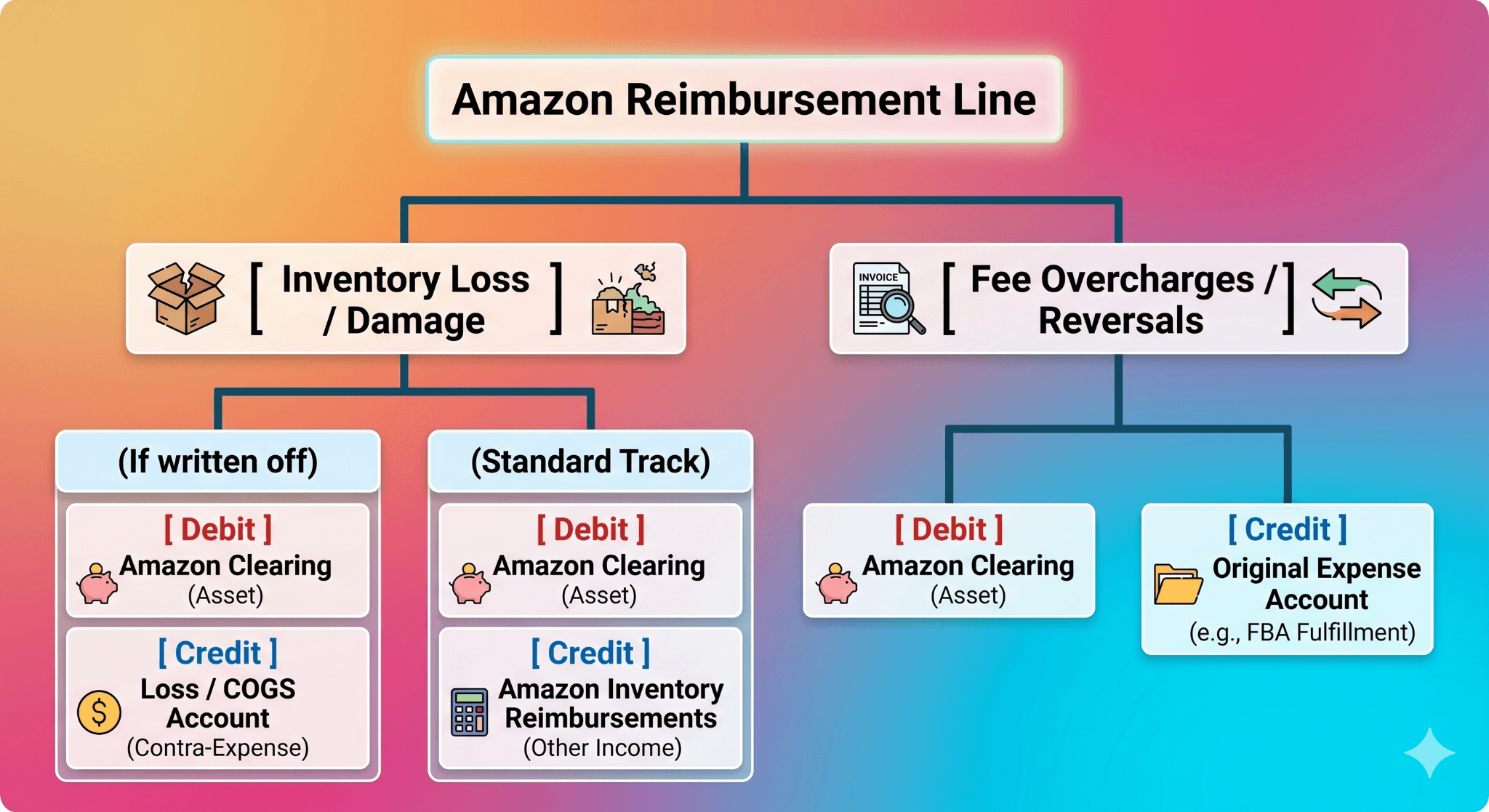
Scenario A: Inventory Loss & Damage Recovery
If you previously wrote off the inventory when it was flagged as lost or damaged:
Debit: Amazon Clearing (Asset/Bank Account)
Credit: Loss on Inventory / COGS Write-offs (Contra-Expense)
If you prefer to preserve your write-off history clean on the P&L, credit an "Amazon Inventory Reimbursements" account nested inside Other Income. This ensures that regular operational gross product sales are never artificially inflated by inventory recoveries.
Scenario B: Fee Overcharge Collections
When Amazon returns cash for miscalculated dimensions or wrong category assignments, treat it as a direct reversal of the error:
Debit: Amazon Clearing
Credit: Amazon FBA Fulfillment Fees (or the corresponding original fee account)
Automated Cloud Integrations
Specialized accounting software tools like A2X, ConnectBooks, or NeonPanel streamline this process by splitting these types apart automatically. A2X maps inventory damage adjustments directly to dedicated ledger lines under Other Revenue, while netting out overcharges cleanly against your operational fee accounts to maintain matching balances.
3. Handling FBA Refunds and Returns in QuickBooks
When a customer initiates an FBA return, Amazon manages the front-end transaction automatically, withdrawing cash from your account and updating its internal systems. Under US GAAP, sellers must treat these reversals via a dedicated contra-revenue workflow.
The Accounting Lifecycle of a Return
When a refund executes, Amazon pulls the product price back, returns a portion of the original referral fee, keeps the initial fulfillment fee, and potentially assesses a returns processing charge.
To illustrate, consider a standard, resellable return where the item successfully returns to the FBA warehouse shelf.
Step 1: Reverse the Sale (The Revenue Ledger)
Debit: Sales Returns and Allowances (Contra-Revenue) — Do not debit gross sales directly.
Debit: Sales Tax Liability (If Amazon reverses sales taxes collected on your behalf)
Credit: Amazon Clearing (Reflecting the cash withheld by Amazon)
Step 2: Restore the Asset Ledger
Because the item is verified as sellable, it must be returned to your balance sheet assets:
Debit: Inventory (At its original inventory cost)
Credit: COGS – Product
What if the item is unsellable?
If the returned unit is damaged or designated for immediate destruction, skip Step 2. Leave the cost inside COGS, or execute a journal entry moving the amount from COGS to a specific Inventory Write-offs / Unsellable Returns expense account.
4. The Danger of "Net Deposit" Accounting
Many growing e-commerce companies simplify their books by assigning the bi-weekly lump-sum bank deposit from Amazon directly to an income account titled "Amazon Sales."
This practice obscures critical financial data and can lead to major operational issues:
Distorted Revenue Realities: Your true top-line revenue is obscured because product returns, discount codes, and operational fees are all pre-netted inside that single deposit. This creates an immediate mismatch between your QuickBooks records and your official IRS Form 1099-K filings.
Hidden Operational Leaks: Critical margin drivers—such as aged storage fees, high return rates, and low-inventory penalties—are rendered completely invisible on your profit and loss statements.
Audit Liabilities: Due diligence reviews by prospective buyers, lenders, or tax auditors often fail when matching gross settlement receipts to historical bank imports proves impossible. One accounting firm uncovered several hundred thousand dollars in unresolvable variances tucked away in "Deposits in Transit" simply because a client coded net cash payouts instead of proper individual settlements.
5. Step-by-Step Guide: Reconciling Amazon Settlements to QuickBooks
To secure clean financial visibility, implement a weekly or bi-weekly reconciliation protocol anchored to your official Amazon Settlement Reports.
Step 1: Establish Your Amazon Clearing Account
Create a Current Asset or Bank-type ledger account named "Amazon Clearing" in your QBO Chart of Accounts. Think of this ledger as an escrow account: transactions populate it throughout the cycle, and the final net cash deposit clears it out.
Step 2: Extract Your Settlement Source Documentation
Inside Seller Central, navigate to Reports → Payments → All Statements / Settlements. Download the precise financial repository matching the exact payment block cleared to your bank feed. Export the data to a CSV format and group individual transaction items by their structural labels.
Step 3: Map Data Blocks into Summary Ledgers
Consolidate the hundreds of tiny lines into macro-ledgers:
Gross Product Sales (Full Item Price)
Outbound Shipping / Gift Wrap Income
Promotional Markdowns & Discounts (Negative Values)
Sales Returns & Allowances (Customer Returns)
Fee Expense Groups (Isolate Referral, Fulfillment, Storage, and Placement)
Reimbursement Lines (Isolate Fee recoveries vs. Physical Stock losses)
Step 4: Execute Your Settlement Summary Journal Entry
Using your summarized settlement matrix, post a single journal entry in QuickBooks Online at the close of the settlement window.
Sample Settlement Journal Entry
Account Name | Debit | Credit |
Amazon Clearing (Net Amazon processing balance) | 7,650.00 USD | |
Sales Returns & Allowances (Customer refunds) | 1,200.00 USD | |
Amazon Referral Fees (OpEx Selling Fee) | 1,500.00 USD | |
Amazon FBA Fulfillment Fees (Base + Surcharges) | 1,800.00 USD | |
FBA Storage Fees (Monthly storage) | 400.00 USD | |
Amazon Low-Inventory Fees (Supply chain penalties) | 150.00 USD | |
Product Sales (Gross top-line sales text) | 12,000.00 USD | |
Shipping/Gift-wrap Income (Collected revenue) | 200.00 USD | |
Amazon Inventory Reimbursements (Other Income) | 500.00 USD | |
Total | 12,700.00 USD | 12,700.00 USD |
Step 5: Clean Your Bank Ledger Match
When Amazon triggers the physical electronic funds transfer into your operational checking account, the transaction will appear in your QuickBooks bank feed.
Do not categorize this import line as new sales income. Instead, record the transaction as a Transfer from Amazon Clearing.
[ Settlement Posted ] ──> Debits Amazon Clearing Asset Account
[ Cash Deposit Hits ] ──> Credits Amazon Clearing Asset Account (Balancing to Open Reserves)
The cash received will match your settlement entry perfectly, reducing your Amazon Clearing account balance down to open rolling reserves.
Step 6: Verify Balances and Audit Your 1099-K
At the close of every month, cross-verify that your ending balance in your QuickBooks Clearing asset account matches the open rolling reserve balance stated in your Amazon Seller Central dashboard.
During year-end closing procedures, execute a reconciliation review: take your aggregate 1099-K Gross Revenue Receipts, strip out marketplace-facilitated sales tax totals, and verify that the remaining balance ties directly back to your internal QuickBooks revenue accounts. This step guarantees that your financial reporting remains structurally bulletproof, fully compliant with US GAAP, and optimized for strategic business decisions.